Oz NDY – REVIT vs AutoCAD Discuss…
Introduction
This blog aims to get a discussion going on the topic of utilising CAD packages in your design offices. I’ll kick-off with NDY’s set-up…
REVIT is seen, pretty much construction industry wide and certainly at NDY, as the flagship CAD package. We have a dedicated CAD team that solely use REVIT, although skills do exist for other CAD packages such as AutoCAD.
NDY promote their use of REVIT and like to express this to their client base so they are seen as operating with the latest industry technology. However, there is a problem. I’ll use my current section, Interiors, as an example of a typical project.
Problem
The Interiors Section of the Existing Buildings Department focuses on short-term projects, usually 6 – 8 wks. Therefore, turn-around times for CAD drawings, in particular, are tight. If the design is of specific technical complexity then usually REVIT will be: a) requested by the client and b) preferred by us as we can programme in the CAD requirements and resource through our dedicated CAD team. However, due to short project deliverable timelines and sometimes more basic CAD requirements along with client requests for only needing simple drawings, it can be a lot quicker if these are created ‘in-section’ (opposed to in-house) using AutoCAD. This negates the need to resource to the CAD team which they prefer as their bread and butter work, for the core departments working on large complex projects, can continue unhindered.
The AutoCAD capability exists in the Interiors Section so this affords us great flexibility in managing project deliverables and in-turn removes pressure from the wider office.
In addition, NDY also have an outsourcing capability in Indochina where we have a process in place that outsources CAD requirements. A great capability but for short-term work the lead-time required for the process to work efficiently means that we still prefer to do this in-section. It also means we can make amendments and re-issue drawings in the most efficient and effective manner.
As time is money you can see how this creates cost savings, especially when you compare the technical skills required between using basic AutoCAD and REVIT.
Discuss…
I’ll leave it there with the hope to spark a discussion about your experiences and thoughts…
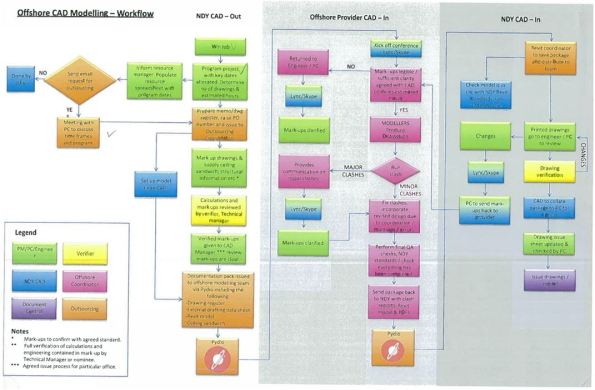
Edited with Outsourcing CAD process.
 Holdfast Training Services Trial Blog
When you say you have a CAD dept Fran, does that mean you have draftsmen in a similar fashion to the Corps? If you outsource to Indochina how does communicating the design to get it ‘CADed’ work? My experience so far in Baltimore is that the PE’s in the office do all the REVIT work themselves (I have yet to do more than look at a model). But even integrating between disciplines within the same country causes heavy email traffic.
Henry,
My experience seems to be the same as yours, we have two CAD / REVIT specialists, but everyone is expected to be able to use the packages and does. I’ve not had to use it yet, but can see it approaching on the near horizon, which is a little daunting as I don’t have a clue how to use it properly.
Rich, doesn’t the company provide training? Especially if you’re expected to know how to use it.
Fran,
Formal training – no. It seems to be a case of get on youtube and ask as you go. Someone is pulling together a bit of an information booklet as a reference guide. I’m going to download a copy at home to have a play and also look at it when I get into the office in a morning – we’re tight on the number of licences we have.
Henry,
Essentially yes. The CAD team members work with the project engineers from all engineering disciplines within the office to create the REVIT models and manage change requests and updates as and when required. NDY also has a BIM capability so can prepare REVIT models during the design phase and issue to sub-contractors with Level of Detail (LOD) 250 (comprehensive geometry attached to model objects) ready to create construction documents and shop drawings.
For outsourcing we have a process which involves PMs, PEs, Verifiers, CAD team, Doc controllers, and outsource/offshore co-ordinators who all play a part in the process (hence the lead-times required). I’ll edit the blog with the process flow chart.
I’ll have a better look at the flow chart when I get back to work. Aware that you’ve only been in post for a couple of weeks how robust, and slick, do you think all of those moving parts are? VS the designers doing it themselves?
Very true and I’m sure there is a case of “it’d be quicker if I just did it myself” but then it’s also about the cost of someone in Indochina doing it rather than Australia etc.
The process was mentioned in the weekly Director’s mtg so I’m sure there is an amount of hand holding required on our part. Hopefully I’ll get the opportunity to use it myself so I can give an update on the reality vs the intent.
We have a similar set up with a dedicated CAD team in Leeds. You scan your sketch send it to them and they draw it. We also have one CAD monkey in our office to do the short turn around items. The system seems to works and it’s much better than me trying to do it on AutoCAD or anything else – it would just be a mess if I did it!
I have found an issue with modelling software. We were taught to use a whole suite of modelling software, but in WYG it’s very much the sole property of the geo or bridges section. I need some pretty simple modelling done that would take me about an hour in Bentley. The bridges section are too busy to do it, plus it’s really simple for them. But I can’t do it myself, they won’t give me the software because (and I quote some bloke from the bridges section) “it’s very complicated and I probably wouldn’t know how to use it”! So now I’m in a catch 22 situation. They won’t do it because it’s too simple for them, but they won’t let me do it because my job description doesn’t have the word “bridge” in it, an the whole time this bloke is in Leeds so I can’t slap him!
Interesting. I have played with ReVIT and the learning curve – coming from years of fiddling with AutCAD seems steeeeep. Moreover, the limitation appears to me to be the fact that, to build a ReVIT model, one requires access to a full library of ReVIT objects. So for, example, if I wanted to do a cellular beam structure ( to assit our BS friends with thier wires ‘n pipes) where do I get cellular beam objects from?
It may be that in building services the world of component libraies is better developed; but there is always the issue of specification by performance rather than simply using a particular manufacturer’s object because that’s the only object availble for the particular component.
I taught myself Bentley RAM (it’s the structural modeller) . On the one hand it took a while; consequent ‘a just little change’ architectural bombshells were really easy to accomodate; I really found that blind faith in the full depth of what a designer could do with the model was not always justified …you really really have to be able to ‘fag packet’ design results to check that the model is what you though it was.