Engineer Sketching – Recommendation for Phase 1 and Phase 2 Students
This is hopefully a quick blog with a basic recommendation aimed at Phase 2 students just writing their first TMRs and the students about to start Phase 1 at PEW. It’s probably a bit late for Phase 3 students just finishing off thesis.
Since starting work in the design office I’ve been surprised at how much time I spend producing sketches and technical engineer drawings. Id say approximately 55% of my hours are committed to this work rather than reading through code or churning the calculator. This is because the main method of communicating technical design detail is with sketches and drawings and generally clients/subcontractors tend to miss information contained in text when analysing a dwg. So far I have worked on three types of Dwg/Sketch:
- Engineering Concept Design – Used to provide general information on the way in which something is built. These are most commonly used in method statements and design proposals. As these are general concept dwgs they are normally produced by the Engineer because it is cheaper and quicker than getting a Draughtsman to do it. They still go the client so therefore need to be reasonably professional.
- Calculation Sketches – These sit in my calculation pack and are there to add context to a calculation process. Generally these are internal and are never formally assessed so these are quick and rough.
- Formal Drawings – These are the output Dwgs from weeks of design work and are the main method of relaying information to a client. These therefore need to be highly detailed, professional and accurate. As such these are always produced by specialist Draughties using CAD. This can take ages (weeks) and is very expensive, as such we only use this method when absolutely necessary.
So the advice focuses on the first of these three. I am terrible at making Dwgs look neat and professional. I spent a few weeks wondering how the guys in the office produced such exceptionally neat hand sketches. We even have a sketch of the month competition and my attempts were, until recently, a million miles away from winning.
That is until I found out there is free computer software you can download that helps you make rubbish hand sketches look good! As I started using it this week I thought it would be helpful for those students producing Dwgs for TMRs or those on Phase 1 producing sketches for the design problem coursework. You produce your rough sketch, scan it in then edit and add detail as required.
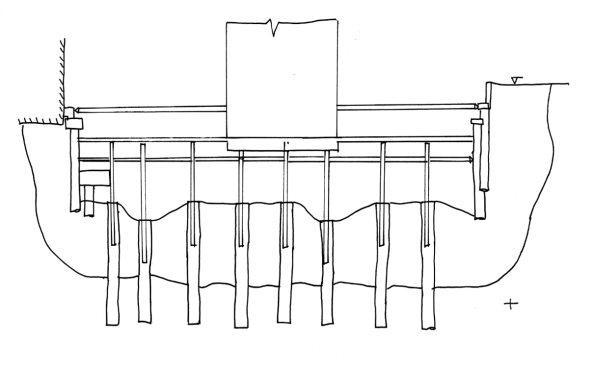
Here is my hand sketch, using tracing paper, for one stage of a basement construction method statement pre-software.
And here are a couple of my sketches after some computer magic.
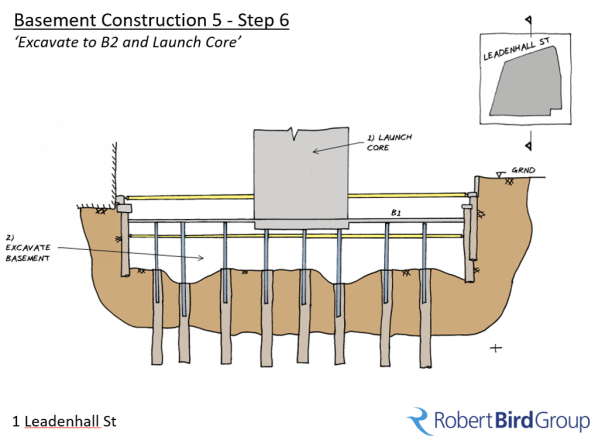
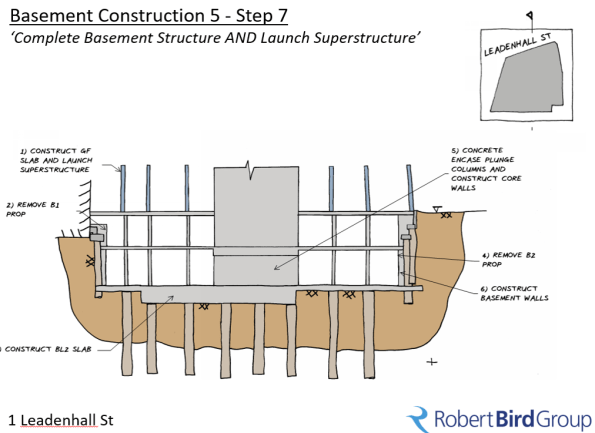
Still rough I know but a considerable improvement! The software is called ‘Gimp’ (no joke). I’d recommend downloading it and using it for coursework.
 Holdfast Training Services Trial Blog
Tom – Thank you for this, I know its late in the day but this is very useful.
I know GIMP – as you might expect….it is a Photoshop -alike and , in the same manner, I found it has a steep learning curve
What can be done in GIMP can pretty well be done in Paint.NET …but I found the learning curve easier
BTW have you a complete set of stage sketches- on your course feedback I’m collecting Method Statement material to give a better description to the next batch
No problem, I’ll send you across a copy of the completed design proposal slide pack once we are finished.
I found the learning curve ok on it, by the second sketch it became much more efficient than hand drawing the same sketch 3 times over (As I often did during phase 1 design tasks due to errors). The ability to edit out mistakes and still make it look reasonably professional has proved very useful.