3D pdf models
We are about to install a section of beams to support a Mezzanine floor level. The supporting structure is made from expLORe pre-cast walls (Laing O’Rourke’s own brand of twin wall). In the photo you can see the pre-formed pockets where the steel beam will bear into the 8m high wall at mid-height.
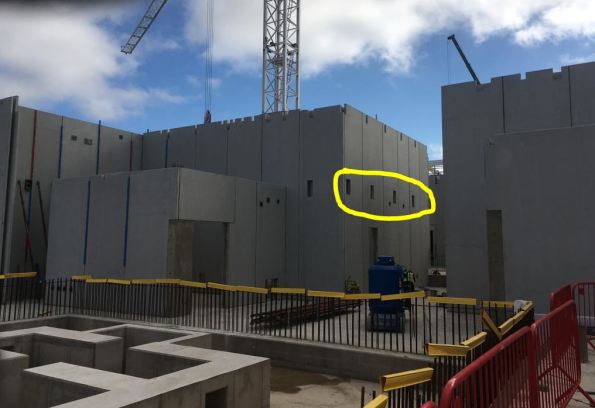
The pre-cast walls have a 16-week lead time for manufacture and so detailed installation considerations had to be made several months ago. In order to develop this, our on-site Digital Engineer modeled the installation angles the beams would need to achieve whilst on the crane hook. This check identified the need to oversize one of the pockets so beams could be ‘maneuvered’ into place.
The point of this blog is to showcase 3D pdfs. I had never seen this. Download the file on from this link.
It allows you to send 3D models to those without expensive software – an ideal method to communicate information where 2D drawings lack detail.
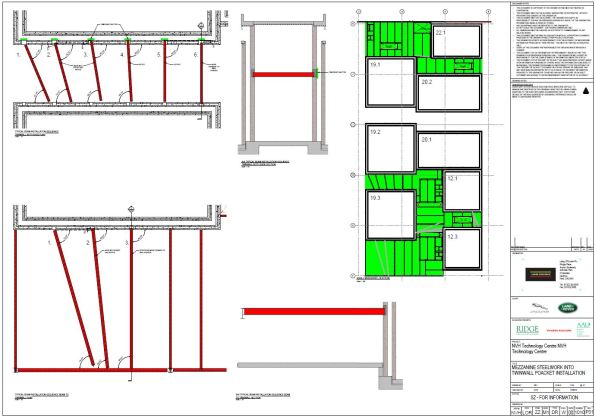
A very useful tool for the generalist RE when developing RAMS maybe…?
 Holdfast Training Services Trial Blog
Not seen this before.
Looking at the information tree in the 3D pdf , it looks like the source may have been a REVIT model?
I hate to be a pedant but either the modeller is being pessimistic on the panel verticality or the pocket size or the modelling is wrong.
As a beam is swung in they can occupy one extreme edge of the pocket to give the shortest apparent length to be able to then swing back into the opposite pocket. In this model the wrong less beneficial) pocket edge has been used in the first manoeuvre…
unless you know differently of course!
( probably best viewed in the shaded illustration with bright light view combo)
Hi John,
Yes, REVIT used for original. Not sure how to ‘print as pdf’ to generate a model view – will find out. Within the capability of a RE draftsman, I’m sure.
I see the point you raise about extreme edge. I know we tried lots of pocket sizes with this and the option in the drawing was the most practical. I should see the install before leaving Ph2 so will let that be the judge!
Click to access mezzanine-beam-instalation.pdf
Test to see if this file share works…
James Ash has some good examples of 3D pdf from his Phase 3.
Suggest it is a very useful skill to learn how to make them from Navis or Revit – very powerful communication tool accessible to any user with Adobe.