Site Diary
When I arrived on Ph2 I was given four options for maintaining a site diary:
- The official BAM form (Not very user friendly and requires printing and binding)
- A home made excel spread sheet (designed for a different job)
- iPad Field 360 (the consensus from our site is that it is a v.poor piece of software that requires a great deal of time and investment)
- A blank note pad!
I have tried all of these and can conclude the classic note pad won for its ease and ability to go anywhere!!!
However…maybe technology has finally turned up trumps.
Our GF has been using an App on his phone called ‘Day One’. Its a daily diary app that allows you to tag photos, write text, etc but auto links a location, time, weather…. Furthermore, it allows you to search for events with far more ease than the other IT options in use with BAM. All events can be shared with ease or exported as pdfs.
I have use it now for a few weeks and it has increased the level of detail I have recorded as well as drastically reducing the time and effort involved to stay up to date. The only negative I can identify is the risk of using mobiles on site which must be managed accordingly, dependant on your site.
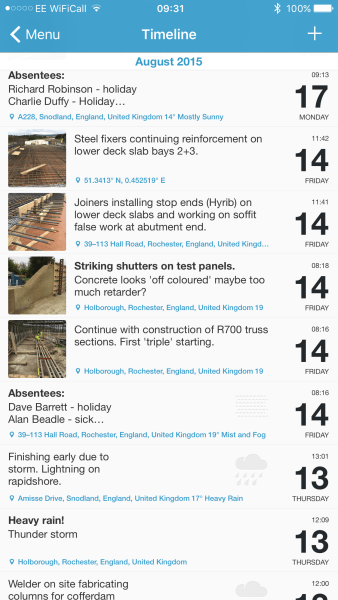
Diary overview with thumbnails and titles.

Annotated photo with auto linked information
In my opinion it’s a tick VG for Day One and certainly something for the Ph1s to consider if they are not constrained to company policy.
 Holdfast Training Services Trial Blog
Ollie – Looks good. I’m using a mixture of trusty (slightly…very dog eared) notebook and the USACE Resident Management System (RMS) computer system to track my daily QA/QC inspection reports. This captures data from site and acts like a site diary. This is OK but there is the obvious double handling element. I like the auto populate feature for weather. Sometimes a contentious issue. Where is the weather station and how accurately does it relate to your site? We have issues at moment in the interior rough in elements where temperatures are concerned (glues require installation and maintenance at a certain temperature, grout requires special measures as temperature drops…). This means we sometimes have to keep a close eye on them. The principal contractor seems to be relying on a computer system to track, but we have proven with on site thermometers that this is not wholly representative of site conditions so we have had to slap their QC dept. wrists.
I guess this app is open source, does it tie into any of the contractor ‘approved’ IT, is that what you meant when you say ‘shared with ease’? (specifically, can you cross reference the site diary with the approved schedule (programme)? That would be a neat trick, especially if you could attach the weather data, actual start/finish dates and durations / deficiency reports etc.
JH have a site diary app for IPADs which I find really easy to use. It has drop down boxes to select where you are and has the ability to classify your entry i.e. quality, progress etc. This allows people to search entries easily. Although there have been a few pushes to get everyone using it, nobody does. Everyone seems to revert back to personal note book and pen. Not much use when some one else is trying to find something in the future. On a separate note we have a number of time lapse cameras on site which are proving useful for reviewing subcontractor time sheets.